Server Virtualization with VMware Infrastructure (vSphere)
Contents
In the last few years, the Internet has become increasingly important in various fields of our lives. Not only personal households have discovered the nearly endless possibilities of the Web, but also companies found many different ways of gaining revenue through the online world. Most of the global players and many medium-sized IT companies have realized what opportunities the Web and its technologies provide and used them to build up new services for consumers and businesses. In order to compete with the evolving market, companies of traditional business areas such as newspapers or TV broadcasting companies had to diversify their product lines and are forced to react in a fast, flexible and cost efficient way on every day’s changes of demands and technologies. In fact, every company has to adapt these technologies efficiently to have a chance in the growing market.
As it brings its benefits, cost savings and new customers, every new technology also comes with the more or less known downsides. Even if IT managers are qualified to consider most of the details in how to use and implement them, new software, hardware or resources will - no matter what - always cause unpredicted problems. Due to the IT dependence of today’s companies, every downtime, bug or system overload of a production system directly results in declining profits and higher costs. Especially for service providers, every downtime is business critical to many dependent companies and has to be prevented.
Therefore, companies spend a considerably high amount of money and time to create a stable, flexible and extensible IT environment that supports their business by minimizing risks, increasing availability and allowing to provide better service levels to customers.
Virtualization is a key technology that addresses to achieve these goals. It allows to run multiple virtual computers on the same physical system. By creating an abstraction of the underlying hardware, it allows to execute a variety of virtual machines (VMs) on top of a virtualized hardware.
This article will discuss how the technology of virtualization works, what advantages it offers and why it is an essential part of today’s data centers. The focus will be the server virtualization solution VMware Infrastructure, the flagship product suite of VMware Inc.
Update May 2010
In May 2009, VMware rebranded VMware Infrastructure to vSphere by releasing version 4 of the product. According to VMware, the new version of the product “extends the previous generation” in and “is the core of [its]cloud computing initiative”. Please note that supposedly almost all features described in this article also apply to vSphere. A comparison of vSphere and VMware Infrastructure can be found in VMware’s knowledge base.
Download as PDF: This article is a slightly shortened version of my seminar paper. Feel free to download the original PDF version, or the presentation slides.
1. Evolution of Data Centers and Software Deployment
Traditionally, each big enterprise - be it an IT company or anything else - had their own IT department, their own IT infrastructure and therefore also a data center where all required services such as e-mail, SAP and Web servers were hosted. Over the last decade, the ongoing trend of outsourcing has changed a lot in the modern IT landscape. Companies continuously try to eliminate cost generating areas and outsource them to external service providers.
1.1. Software as a Service
Not only many data centers, but also applications and services are operated and administered by so called application service providers (ASPs). Unlike the classic approach where software has to be purchased, licensed and installed on company owned servers, “in the Software as a Service (SaaS) model, the application or service is deployed from a centralized data center across a network [..] providing access and use on a recurring fee basis” (SIIA, 2001 [was at: http://siia.net/estore/ssb-01.pdf, site now defunct, July 2019]). That is instead of generating uncompensated costs by running and maintaining required non-revenue generating services, one can concentrate on the core business and leave updates, security fixes and high availability issues to the service provider.
1.2. The Impact of Virtualization on SaaS Providers
While service providers are expanding their data centers, more and more companies reduce their IT to a minimum and “rent” many applications from ASPs. Hence, service providers have to shoulder thousands of different applications and operating systems (OS) in their own data center. Each of them has to be available 24/7 and adjustable to the customer’s wishes. Managing data centers of this size is very expensive and requires special technologies to be operated efficiently. Server virtualization, i.e. the hosting of many different guest OSs on one physical system, is a key technology for SaaS providers and has a major impact on their profitability. Due to the fact that virtualization reduces the number of required physical servers, a virtualized data center can minimize the hardware costs while at the same time allowing a flexible way of distributing resources to customers. Multi-tenant applications are designed to serve many customers at the same time, but often do not include the functionality to flexibly distribute available server resources such as memory or processor time. Virtualization implicitly includes the ability to assign resources according to any kind of rules. Service providers can for instance base resource allocation according to their pricing model and hence attract any kind of customer.
Moreover, virtualization allows SaaS providers to easily provide image-based virtual servers on the one hand, but makes it also possible to customize an application or operating system elaborately on the other hand. That is, service providers can for instance charge a small amount of money for a standardized virtual server with few processor power, and charge a higher price for adjustable systems with more CPU power.
On the application side, many services are designed to serve only one customer or organization. Virtualization makes it possible to run normal single tenant applications as if they were designed for more users without having to redesign them. It also can bring other benefits such as highly isolated systems or a better control over the service levels.
In fact, “the benefits are so significant, that [..] no SaaS provider will be able to be competitive without using virtualization.” (Parallels, 2007)
Download as PDF: This article is a slightly shortened version of my seminar paper. Feel free to download the original PDF version, or the presentation slides.
2. Defining Virtualization
VMware Inc., “the global leader in virtualization solutions” (Reuters, 2008 [was at: http://www.reuters.com/article/idUS96187+15-Sep-2008+BW20080915, site now defunct, July 2019]), defines virtualization as “the separation of a resource or request for a service from the underlying physical delivery of that service” (VMware, 2006). That is, virtualization provides a layer of abstraction between the physical resources such as CPUs, network or storage devices and the operating system. The separation of hardware functionality from the actual physical hardware allows the creation of an idealized virtual hardware environment in which an operating system can run without being aware that it is being virtualized. In fact, the virtualization layer, also called hypervisor, makes it possible to run multiple operating systems simultaneously on the same underlying hardware.
Each of these virtual machines (VM) stands for a complete system and has its own set of freely configurable virtual hardware. It is just like a physical computer - with network card, hard drive, memory and processor. And as with every computer, it is possible to install almost any kind of operating system on it. The underlying virtualization software, i.e. the virtualization layer is responsible for the emulation and mapping of the host’s physical resources to the virtual machine and its guest operating system. That approach makes virtual machines almost hardware-independent, so that it can be moved from one host to another without having to argue with compatibility issues.
2.1. Advantages of Virtualization
Using virtualization technologies can bring enormous cost savings to companies which are managing their own data centers. In times where services have to be up 24/7 and every second of downtime leads to declining profits, a stable IT environment is an absolute necessity.
Without a virtualized data center, companies often waste a lot of resources by running only one application per server. In order to minimize the risk of attacks or total system failures, they try to make sure that an application can in no way affect another service in terms of security and workload. A consequence of this “one-application per box” approach is that many servers have a very little degree of capacity utilization and expensive machines almost lie idle CITE. The whole IT infrastructure is often designed for a worst case scenario instead of being optimized for optimal hardware utilization. Virtualization can create an IT environment in which memory and CPU resources are balanced and ideally loaded with up to 60-80 percent of the host’s resources (Wolf et al., 2005).
Furthermore, the considerably high amount of required physical machines in a non-virtualized environment leads to big and cost-intensive data centers with high cooling and operational costs. Not only environmental organizations and activists, but also many IT managers increasingly ask for small and “green” data centers (iX, 2008).
Another common challenge in traditional IT data centers is the scheduling and minimization of planned downtimes in which hardware can be repaired or software can be modified. Since virtual machines can be copied by simply cloning them, one can safely perform security updates or any kind of system changes in the exact same environment as the production machine is running. This allows to maximize server availability and uptime significantly. VMware for instance claims to have customers that are running their VMs for over three years without a second of downtime (VMware, 2007 [was at: http://www.vmware.com/files/pdf/VMware_paravirtualization.pdf, site now defunct, July 2019]).
2.2. Types of Virtualization
In contrast to desktop virtualization in which an operating system is the basis for the abstraction layer (hosted), most server virtualization solutions do not need a full underlying host OS (bare-metal). The bare-metal or hypervisor architecture “is the first layer of software installed on a clean [..] system” (VMware, 2006). There are generally three well known approaches being used by the top virtualization projects, that is full virtualization, paravirtualization and hardware assisted virtualization.
They all have in common that they make use of the typical privilege levels of the processor architecture in order to operate directly on the physical hardware - in the supervisor mode. The major virtualization solutions support different processor architectures, but nearly all of them work with the x86 architecture. The x86 has a hierarchical ring architecture with four rings. Ring zero for privileged instructions of the operating system (kernel), ring one and two for device drivers and ring three for application instructions.
Full virtualization creates a fully simulated machine by placing the abstraction layer in the lowest ring and moving the guest operating system up to ring one. Every privileged instruction of the guest system is being trapped and rewritten (binary translation) by the virtualization software and then passed to the actual hardware. User applications can run their non privileged code directly and with native speed on the processor. The hypervisor simply passes the unmodified code to the CPU so that there is almost no virtualization overhead. Neither the guest OS nor the physical hardware are aware of the virtualization process which is why this approach supports the widest range of operating systems and hardware.
Unlike full virtualization, the technique of paravirtualization requires the guest OS to be aware of the fact that it’s being virtualized. In order to communicate with the virtualization layer, the guest system has to be modified. Instead of trapping all kernel instructions, the paravirtualized guest only handles and translates the non-virtualizable code and therefore runs much more instructions with near-native performance. Moreover, it can use the guest’s device drivers and therefore support a wide range of hardware. The downside is that since the kernel has to be modified, only open source operating systems can be used as a paravirtualized guest. A well known project using this technique is Citrix’s server virtualization product XenServer.
A fairly new approach is the hardware assisted virtualization. It is based on a new CPU mode (Intel VT, AMD-V) level below ring zero in which the virtualization layer can execute privileged instructions. Each non-virtualizable instruction call “is set to automatically trap to the hypervisor, removing the need for either binary translation or paravirtualization”. Due to the hardware based virtualization support, the guest operating system does not need to be modified and therefore mostly provides a better performance. A drawback of this approach is that the high number of traps leads to a high CPU utilization and hence might affect scalability (VMware, 2007).
2.3. Players on the Virtualization Market
The ongoing trend towards complete server virtualization solutions and the raising demand has led to a very competitive market. Even though VMware Inc., a company owned by EMC, still dominates the market, other big companies such as Microsoft or Citrix are actively pushing their own products.
The key product of the market leader VMware is a suite called VMware Infrastructure which was launched June 2006 and consists in the basic form of the hypervisor ESX, a managing software and backup functionalities. Additional features such as high availability functions or the ability to live migrate virtual machines can be purchased as add-ons. The ESX supports various operating systems and is a mature and production proven system.
Microsoft recently launched its Hyper-V hypervisor technology as a part of Windows Server 2008. The successor of Virtual Server 2005 is a relatively new technology that supports many different Windows versions and the Red Hat Enterprise Linux. At this point, it is not able to live migrate virtual machines and generally has a limited functionality. Since Microsoft’s product is much cheaper than for example VMware’s solution, it remains to be seen what product will be established (InformationWeek, 2008).
Citrix Systems, a virtualization specialist mostly known for the remote desktop application Metaframe/XenApp, competes with its server virtualization product called XenServer. It uses the open-source Xen hypervisor which is based on a Linux kernel and provides almost the same functionality as VMware Infrastructure.
2.4. The Anatomy of a Virtual Machine
After getting some insight in why virtualization is so important for today’s data centers and getting to know the main techniques, it might be interesting to know what components virtualization software typically uses and how it actually works.
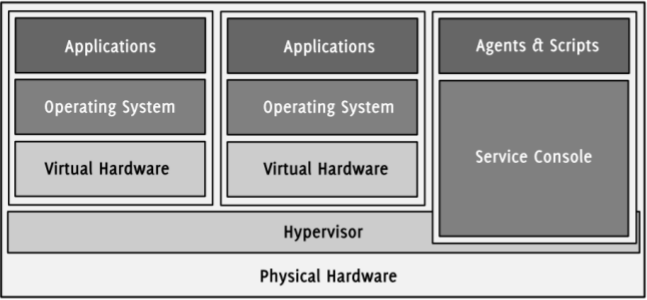
Figure 1: Virtual machines are running on top of the hypervisor (VMware, 2008).
Since the fundamental ideas of all virtualization solutions are similar, the main components of each software are the same and fulfill the same tasks. This paper will briefly describe the essential parts of a typical virtualization software and will take a closer look on VMware’s ESX/ESXi hypervisor.
2.4.1. The Hypervisor / Virtual Machine Monitor
As mentioned earlier, a hypervisor is the core technology of each virtualization software and is often referred to as the abstraction or virtualization layer. It “manages most of the physical resources on the hardware, including memory, physical processors, storage, and networking controllers” (VMware, 2007). Moreover, it includes other base functionalities such as scheduling and allows the creation of completely isolated VMs which then can be run within its scope. Depending on the architecture and implementation of the hypervisor, the extended functionality greatly varies. Each virtual machine is supervised and controlled by the virtual machine monitor (VMM). It implements the hardware abstraction and is responsible for the execution of the guest systems and the partitioning of available resources. Hence, the VMM is a part of the hypervisor that protects and isolates virtual machines from each other and decides which VM can use how many resources (Lo, 2005). Since the scope of functions overlaps and depends on the implementation, both terms are used as a synonym in most literature.
VMware provides two different bare-metal hypervisors, the ESX and the ESXi. Both are light-weight operating systems optimized for virtualization that use different versions of VMware’s proprietary system core VMkernel. The kernel controls RAM, CPU, NICs and other resources (resource manager) and provides access to the physical hardware (hardware interface layer). It also includes a small set of device drivers of the certified and ESX/ESXi compatible hardware. VMware intentionally tries to keep the host’s memory and disk footprint small in order to increase stability and minimize system failures. A small memory footprint also reduces the interference with running VMs and applications and has a direct impact on their speed (Vallee, 2008, was at: http://www.computer.org/portal/web/csdl/doi/10.1109/PDP.2008.85, site now defunct, July 2019).
As for the ESX, it can be additionally controlled by the service console, a full Red Hat Enterprise Linux distribution. The console provides tools to customize the ESX host and allows the installation of custom agents and scripts as on any other Linux system. Important to mention is that the ESX is not based on a Linux system (Zimmer, 2008). The service console is just an interface to access and configure the underlying system and can be thought of as a virtual machine with more access.
The ESXi is a slim version of the ESX which is given away by VMware for free. Apart from many other enterprise features, it lacks of the service console and the support for high availability, live migration and consolidated backups. The disk footprint of the ESXi is only 32 MB which makes it possible to run it from a USB stick or to directly embed it in servers. Most OEMs such as Dell, IBM or HP offer servers with an embedded version of ESXi.
Since both the ESX and the ESXi are very similar and are based on the same code, it can also be referred to as the ESX/ESXi hypervisor.
2.4.2. Resource Management
The host computer on which the virtualization software is running provides resources such as memory or processors. As any other operating system, the hypervisor is responsible for their management and the provision of interfaces to access them. In addition to the normal OS functionalities, it has to partition and isolate available resources and provide them to the running virtual machines.
Modern hypervisors like the ESX/ESXi treat a physical host as a pool of resources that allows their dynamic allocation to its virtual machines. Each resource pool defines a set of lower and upper limits for RAM and processor time. Virtual machines in a pool are only provided with its resources and cannot see whether there are more available. In a resource pool with 8x2 GHz and 8 GB RAM for instance, one could easily run two VMs with each 4 GHz and 2 GB RAM and another eight with each 1 GHz and 500 MB RAM.
2.4.3. Virtual Processors
Each VM is featured with one or many freely configurable virtual CPUs. Each virtual CPU behaves like a real processor, including registers, buffers and control structures. The virtual machine monitor makes sure that a VM only uses the resources that have been assigned to them and ensures a complete isolation of the context. Most virtualization solutions allow to equip VMs with more virtual CPUs than there are actually available. Extensions make it possible to use a physical multi-core environment by dynamically assigning CPUs to virtual machines. The exact behavior of the physical processors depends on which technology the virtualization software uses.
The ESX/ESXi hypervisor is an implementation of the full virtualization approach with few elements of paravirtualization. That is, the VMM directly passes and executes user-level code to the real CPU with no need for emulation (direct execution). This approximates the speed of the host and is much faster than the execution of privileged code. The guest OS code and application API calls are executed in the much slower virtualization mode (Zimmer, 2008). The hypervisor only supports the x86 architecture and makes high demands on the hardware, but is very flexible in terms of CPU time partitioning. The frequency of all physically available processors is simply summed up and can be freely assigned to any virtual machine. By assigning minimum and maximum boundaries, one can make sure that a VM does not eat up more CPU than allowed. The VMM is in charge of controlling these limits.
Even though the guest operating system does not need to be aware of the virtualization and perfectly works without any additional code, VMware provides a package called VMware Tools for the guest OS. If one installs the package on the guest system, it automatically provides optimized device drivers, e.g. for network cards or shared folders between host and guest.
3.4.4. Virtual Memory
The memory management of virtual machines is very complex and also handled by the VMM. Every running VM is provided with virtual RAM and has no direct access to the physical memory chips. The hypervisor is responsible for reserving physical memory for the assigned virtual RAM of all guest systems. Just like a normal operating system creates and manages page tables and a virtual address space for each application, the virtualization layer presents a contiguous memory space to the VM. The guest OS is not aware of the fact that every performed “physical” memory access is trapped by the VMM and translated to a real physical address. Hence, the actual process of mapping the VM’s memory to the host’s physical RAM is completely transparent.
In the scope of CPU virtualization, the total amount of assigned processor time has to be less or equal to the actual available amount. That is, it’s impossible to assign 2 and 3 GHz to two virtual machines of one host if the total available amount is only 4 GHz. In contrast to that, some hypervisors allow to assign more memory to a VM than is physically available. Similar to normal operating systems, the hypervisor uses a swap to extend the RAM. That means, a VM sees the amount of memory that has been assigned to it, no matter how much is really physically available. One could for example assign 3 GB RAM even if the host system provides only 2 GB.
Today’s operating systems have various swapping strategies but are typically programmed to swap only if it is really required. Hence an operating system naturally uses most of the memory that the hypervisor provides. Since the virtual machine’s guest does not know that the data in its “physical” RAM is being swapped, it rather fills the “fast” memory (Wolf et al., 2005). While this brings performance advantages in normal environments where the RAM is not being partially swapped, it leads to a dramatic loss of performance in virtualized operating systems when the limit of physically available RAM exceeds.
The ESX/ESXi hypervisor implements various functionalities to completely control and partition the available memory. In addition to the described over-commitment of memory, it includes a number of technologies to control the usage of RAM within the virtual machines. It might for instance be necessary to take back physical memory resources from a VM in order to give it to another one. Maybe one has added a new VM and likes to reserve at least 500 MB memory for it. At that moment, the VMM has to get back the physical resources from running VMs.
To do so, the hypervisor must be able to dynamically force VMs to start the swapping process instantaneously and release data from its virtual RAM. VMware solves this problem with a function called Memory Ballooning. To function correctly, it requires the installation of VMware Tools inside the guest system.
Another function, the Memory Idle Tax, bars the VM from keeping unaltered data too long in the memory. By charging more for idle memory pages, the guest OS will tend to swap them earlier than it had done it without the tax (Zimmer, 2008 and VMware, 2008).
2.4.5. Virtual Networking
Virtualization would hardly be useful at all if it was not possible to somehow network VMs together and connect them to a LAN or the Internet. Virtual machines can be connected to a network just like any physical machine. For this purpose, they can be equipped with virtual network interface cards (vNIC) which behave just like normal network cards. Each vNIC has its own MAC address and therefore its own identity on the network. The operating system communicates with the network card through its standard device drivers and therefore requires no changes in the kernel.
A virtual network is a network of VMs running on the same host. Each VM has one or more virtual network cards and is connected to a virtual switch (vSwitch). The host system provides at least one virtual switch that logically connects the virtual machines with each other. A vSwitch routes sending and receiving data from or to virtual machines internally. That is, any traffic between VMs does not leave the host computer and is not send though any physical cables. In addition to the virtual ports where VMs can connect to, a virtual switch has one or more uplink ports to which Ethernet interfaces of the host computer can be connected. That allows to interconnect the virtual network on the host computer with the outside network beyond the host’s NIC. For connections between an outside net and a virtual machine, the vSwitch behaves just like a physical switch.
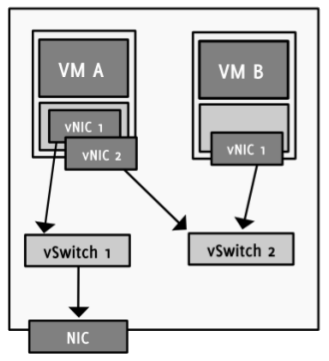
Figure 2: Virtual machines can be connected to both internal and external networks.
Virtual machine B has no access to the external network (VMware, 2007).
Even though the basic tasks are the same as for physical switch boxes, there are few differences where virtual switches extend or reduce the functional range. VMware enforces a single-tier architecture in their virtual network, i.e. there is only one layer of virtual switches. Due to the fact that this does not allow interconnecting vSwitches, “the Spanning Tree Protocol (STP) is not needed and not present” (VMware, 2007). STP is used by physical switches to prevent the configuration of network loops. If more than one Ethernet interface is connected to the uplink ports, VMware provides a technique to use them as a team. The feature called NIC teaming allows the creation of a fail-safe and load-balanced network environment. The team of NICs can be configured to spread the network traffic and share the load to avoid bottleneck situations of data packets. At the same time, it creates a failover configuration in which the malfunction of one NIC does not lead to a total breakdown of the whole system (VI Online Library, 2008).
Another important feature of VMware Infrastructure and the ESX/ESXi hypervisor are Port Groups. A port group can be defined as a group of virtual machines connected to a virtual switch that form their own Virtual Local Area Network (VLAN). That is, one chooses the VMs that are supposed to be in the same virtual network and assigns them to a specific port group. Hosts of the same port group or VLAN can communicate with each other as if they were connected to the same switch, even if they are located in different physical locations. Hence, migrating a VM from one ESX host to another does not change anything in its location within the virtual network (Marshall, 2006).
2.4.6. Virtual Hard Drive Disks
Just like providing memory, network cards or CPU resources, it is possible to assign many different virtual hard drives disks (HDD) to a VM. Unlike other resources, hard drive virtualization is much more flexible. The hypervisor does not necessarily map every access to a physical HDD but creates virtual disks encapsulated in normal files. That is, a virtual disk is nothing more than a large file stored on a physical disk. The operating system within the VM accesses virtual disks like normal IDE or SCSI drives by using its internal OS mechanisms. Hence, they can be formatted with every file system and behave like a normal physical disk.
The major advantage of virtual disks is that in addition to normal HDD functionalities, they can be moved and copied like any other file. Therefore it is possible to store them locally on the host’s disk as well as on drives inside the network. The latter one is more typical especially in enterprise data centers. In addition to a virtual machine network, companies usually create a second so called storage LAN to connect network devices with each other and the hosts.
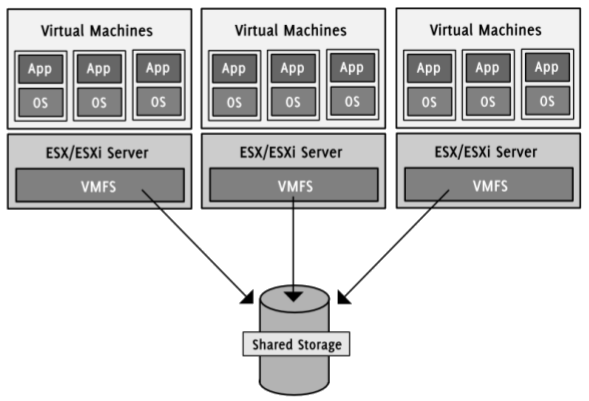
Figure 2: Virtual disks are usually stored on the network.
VMFS allows to access the same storage from different ESX hosts simultaneously (VMware, 2008).
The ESX/ESXi hypervisor supports storing virtual HDDs on direct attached SCSI drives or on shared SAN, NAS or iSCSI storage. VMware developed a special file system for the network devices, the Virtual Machine File System (VMFS). It allows “multiple physical hosts to read and write to the same storage simultaneously [and] provides on-disk locking to ensure that the same virtual machine is not powered on by multiple servers at the same time”. That means that a single storage device can be used to store many virtual disks for VMs on different hosts. If a VM is running, VMFS makes sure that the virtual disk is locked until the VM is being powered down or crashes. If it fails, it can be restarted on another ESX by using the same disk file (VMware, 2008).
Download as PDF: This article is a slightly shortened version of my seminar paper. Feel free to download the original PDF version, or the presentation slides.
3. VMware Infrastructure
VMware Infrastructure is a full data center virtualization solution. Its core technology is the ESX hypervisor that manages the virtual machines of one host. By combining many ESX hosts and connecting them with an internal network, the virtualized servers create a so called cluster and form flexible virtualized data center. Since the servers running in the data center are VMs, one can easily move them around between different hosts. The additional software VMotion makes it possible to move VMs to another physical host while they are running and without experiencing any noticeable downtime. VMware’s Distributed Resource Scheduler (DRS) automates this process by live migrating VMs to hosts with the most available resources. If a physical host crashes, the purchasable add-on High Availability (HA) can restart the VMs on a different ESX host.
3.1. Live Migration
Virtualizing various operating systems on a host allows a very intensive usage of the available resources of a server. It maximizes hardware utilization and makes it possible to run a VM on almost any host system. However, it increases the dependence of all running VMs to their underlying physical server. If only one server fails or has to be replaced, many virtual machines are affected. Live migration is a technology that addresses to solve this problem by allowing to move running virtual machines from one host to another. That is, if a physical server has to be taken down for maintenance, virtual machines running on this host can be moved to other available servers of the cluster. During the process of migrating a running OS with all its applications, every service stays online and does not notice that the physical location of the CPU and memory it is using has changed. This includes connections as well as file handles and sockets. Even the IP address stays the same so that nothing has to be reconfigured inside the VM. Live migration is hence a handy tool to minimize the time in which important customer services are unavailable and improves data center manageability significantly.
However, not every server hardware is appropriate to use as a live migration host. VMware’s implementation of the technology, VMotion, makes high demands on the hardware and precisely defines the requirements to be able use it. Especially in terms of processors, VMware published many compatibility guidelines and exact specifications of what CPUs are supported. Thinking of the fact that virtualization abstracts the underlying hardware from its functionality, one might wonder why VMotion still is so hardware-dependent.
The problem VMware shares with other virtualization vendors it that not all CPU instructions are virtualized and hence no total hardware-independence is given. As described above, non privileged instructions are executed directly on the underlying CPU without rewriting them. This works fine as long as the capabilities of the CPU do not change while the application is running. Due to the fact that exactly this happens while the operating system is being migrated to a different machine, the application will most certainly crash if it wants to execute an instruction that the “new” CPU does not support. Hence, both source and destination CPU have to support the same feature set to make VMotion work (VMware, 2008 [was at: http://www.vmware.com/files/pdf/vmotion_info_guide.pdf, site now defunct, July 2019]).
The detailed technical implementation differs depending on the vendor, but the basic idea of the migration process is similar. In order to facilitate the migration, both source and destination host have be connected to the same network and must be able to access the virtual disk of the VM. Migrating a VM requires transferring the in-memory state of a machine to the destination host. That includes the kernel-internal state (e.g. active TCP connections) and the application-level state with all open processes. The process basically divides into three phases (Clark et al., 2005).
The VM is running on the source host. After making sure that the destination host provides enough resources to run the virtual machine, the VM’s memory pages are copied iteratively to the destination host. The full memory image of the virtual machine is copied once and all pages that have been dirtied while the copying was in progress are scheduled to be resend in the successive rounds. That way, fewer pages have to be send in every cycle while the VM on the source host can continue to run (pre-copy/push phase). When a beneficial point in time is reached and the amount of transferred pages constantly stays low, the VM on the source host is being suspended and the network traffic is redirected to the destination host. To inform the machines in the network that the MAC address of the physical host has changed, an ARP reply is sent either to the router or directly to the machines in the ARP cache of the VM. At this point, both source and destination hold a consistent copy of the VM, so that the source VM can be resumed in case of an error. After this stage has been successful completed, the VM is resumed on the destination host (stop-and-copy phase). Even though the virtual machine is already running on the new host, it is possible that not all parts of the memory have been copied completely. If the guest operating system accesses a memory page that has not yet been transferred, the page is faulted by the VMM and pulled over the network. After the memory reaches a consistent state, the VM on the destination host is activated and the image on the source host can be deleted. This phase is called the pull phase (Wagnon, 2005).
3.2. Data Center Automation and High Availability
Even though live migration simplifies the maintenance works and makes it easier to load balance VMs among different ESX hosts in a cluster, it lacks of the ability to automatically manage the data center without human interactions. VMware’s Distributed Resource Scheduler (DRS) tries to fill this gap by providing a framework for this purpose. DRS automatically migrates VMs to different hosts in a cluster based on freely definable rules. It monitors the resources on all registered ESX hosts and balances the load according to the current needs and the specified priorities of the virtual machines. This can reduce the amount of required administration and contribute to an optimal utilization of the data center.
Additionally to the automated load balancing and utilization control via DRS, VMware offers a solution to provide highly available data centers. The additional component High Availability (HA) monitors virtual machines and restarts them on another physical server if it they are not available. For this purpose, it sends so called heartbeats to each VM in a definable interval of time. If a VM does not respond, HA considers it as crashed and tries to restart it either on the same or on a different ESX host.
Download as PDF: This article is a slightly shortened version of my seminar paper. Feel free to download the original PDF version, or the presentation slides.
4. The Downside of Virtualization
Vendors of virtualization solutions often praise their software and make companies believe that a virtualized infrastructure reduces their expenses immediately. And in fact, virtualization certainly can reduce costs in various fields. But without considering all potential problems beforehand, it can turn to a losing deal very quickly. To make sure that this does not happen, both technical and business analysis are a necessity.
4.1. Technical Limitations
From a company’s point of view, the major problem of the currently available virtualization solutions is probably that they are not compatible to each other at all. Citrix, Microsoft and VMware merchandise their own products each with its own proprietary system without having to meet any standards. Having to choose between these products, companies have to bind themselves to one particular vendor for a long period of time. After they have chosen a solution, it is not possible to switch to another vendor’s product even if it would match better to the current business needs. For big data centers, this incompatibility could have enormous consequences and makes the analysis of what-if scenarios exceptionally important. Not only are there incompatibilities between the different vendors’ software, but also within each specific product many compatibility issues occur. The for an automated data center essential process of live migration only works if many qualifications are fulfilled. It is for instance not possible to migrate a virtual machine from a host with an AMD processor to an Intel based machine. Differences in the architecture and the feature set of both vendors make a live migration in most cases impossible (Creeger, 2008). In fact, the different instruction sets such as x86, i64 or PowerPC are a general problem. Once a company has decided which architecture to use in its data center, it is in most cases also bound to the virtualization software. VMware for instance only supports the x86, whereas Xen also supports PowerPC. Hence a heterogeneous IT infrastructure with different architectures or even different CPU manufacturers is almost impossible to manage or maintain.
Another important point is the performance of virtual machines. Due to the memory footprint of the hypervisor, the virtual machines on the host have less available memory for their own tasks. Furthermore, emulating and mapping every access to the CPU and RAM produces a significant administrative overhead. This reduces the overall performance of a host and therefore the performance of each VM. In comparison to the execution of an operating system on bare hardware, a VM does not perform “good or even fair” (Wolf et al., 2005).
4.2. Business Aspects and Costs
While companies are usually aware of the technical challenges, they often underestimate the monetary impact of a new IT infrastructure on their business.
Due to the fact that most data centers have grown throughout their lifetime, they do not consist of homogeneous servers. This makes live migration complicated or even impossible and can be difficult in terms of compatibility as well. The cost-intensive consequence of this is that incompatible hardware has to be replaced by new servers. Furthermore, since virtualization requires shared network storage devices such as Fibre channel or iSCSI, new storage and network devices have to be acquired and installed. Not only are they very expensive to buy, but they also eat up an enormous amount of power and form a big percentage of the overall data center cost.
Another often unconsidered aspect of an infrastructural change is the fact that even though the amount of servers reduces, the complexity of the data center increases. That is, administration gets more difficult and trained specialists will be necessary to supervise the new virtualized data center. Due to the fact that the number of operating systems in the new environment stays the same or even increases, the amount of required system administrators does not change significantly. It is even possible that more staff needs to be hired because the number of administrators “grows linearly with the number of VMs” (Creeger, 2008).
Virtualization makes it very easy to provide services like Web or FTP servers. Instead of having to set up a new machine, installing an OS and configuring the service, a VM can just be cloned from an existing machine or template. This can create a huge problem in terms of licensing costs if many virtual machines use non-free operating systems or software such as Microsoft Windows, IIS or SAP. Currently, most software vendors do not make any difference between a virtual machine and a physical computer. Without a sophisticated inventory management of soft- and virtual hardware, licensing costs could lower the expected savings and the return on investment.
Download as PDF: This article is a slightly shortened version of my seminar paper. Feel free to download the original PDF version, or the presentation slides.
5. Conclusion
In conclusion, virtualization is a very powerful technology but is often misunderstood and overestimated. Even though it can save costs, it requires very intensive preparations and planning to realize possible savings in the long run. On the one hand, the technology is a driving force for service providers and most of them would not survive without it. On the other hand, taking a look in the near past shows how much room for improvement and potential virtualization still has. Missing standards and compatibility issues are only some of them. Most vendors have made considerable steps in the last years and as long as the market asks for new solutions, they will continue to be inventive. So far, market leader VMware clearly is the winner of this competition, but with powerful competitors like Microsoft and Citrix it will be interesting to see who will win the race.