Syncany explained: idea, progress, development and future (part 1)
Contents
Many many moons ago, I started Syncany, a small open source file synchronization project that allows users to backup and share certain folders of their workstations using any kind of storage, e.g. FTP, Amazon S3 or Google Storage.
At the time of the initial annoucement of the project (May 2011), there was a big hype around it. I received many e-mails and lots of support from people around the world. People were excited because the features Syncany offers are great: File synchronization à la Dropbox, paired with storage flexibility (use-your-own), client-side encryption (sorry about that, NSA!), and intelligent versioning.
At the time, I didn’t actually release a runnable version of Syncany. The sole purpose of the announcement (on WebUpd8 and on the Ubuntu Podcast) was to get developers excited about the project in order to get help for the last steps of creating a somewhat stable release. Unfortunately, I was further away from this “stable release” than I could have imagined.
In this blog post, I’d like to recap the idea behind Syncany, what went wrong with the development, and how I brought the project back on track (or so I believe). I’ll also talk about what I plan to do with Syncany and how people can help (if they still want).
Update (28 Oct 2013): I uploaded a short screencast that shows the current code base of Syncany. It’s not much, but I think it captures very well how it works so far. The code running in the video is newer than the one in this post, but the basic idea and principles are of course the same.
Update (14 Feb 2014): I finally got around to writing the follow-up blog post to this one (part 2). Check out Deep into the code of Syncany – command line client, application flow and data model (part 2).
1. Recap of the Syncany idea
As I briefly mentioned in the introduction, the original idea behind Syncany was pretty simple: make a file synchronization software that allows you to easily exchange files with friends – but avoid being bound to a central provider, or any kind of active central system for that matter. Syncany was (and still is) supposed to be as easy to use as software like Dropbox, but have the advantage of using any kind of storage you can imagine. So, instead of having an active central component with its own proprietary protocol, Syncany was supposed to work with regular “dumb” storage like FTP, Samba, SFTP, Amazon S3, and so on. That was a very ambitious goal and it still makes things a bit more complex than it would be with a central intelligent instance.
Up to this point, the feature set sounds really nice, but it still didn’t quite cut it for me: instead of just synchronizing the current state of a folder, I wanted to add versioning capabilities, so that one could restore older versions of a file or use Syncany as backup tool with incremental backups. If you’re familiar with version control systems like SVN or Git, that’s pretty much what I wanted for Syncany. So in the end, one could either use Syncany to share a common folder with a friend and occasionally restore a file, or one could use it to backup his or her files to “the cloud” (I still don’t like saying “the cloud”, still sounds like a buzz word to me). To realize the versioning capabilities and save remote disk space at the same time, I decided to use a technique called data deduplication. Deduplication is widely used in enterprise-size backup solutions to save disk space, but it is quite uncommon for desktop applications. In a nutshell, deduplication breaks files into many data chunks (each about 8-32 KB in size) and keeps track of which chunks make up the contents of a file. Each chunk is only stored once on the remote storage, even if it appears hundreds of times on the local disk – thus saving ridiculous amounts of megabytes or even gigabytes. And remember, if you’re using Amazon S3 or any other paid storage, gigabytes equal monthly payments.
The problem with having so many storage options is that when you use a commercial storage provider like Amazon S3 or Google Storage, you never know who’s going to look at your data, or if your data is going to end up on a flash drive of an overly interested employee. Having these concerns about the long-term confidentiality of cloud storage and the providers’ trustworthiness, it was pretty obvious that files needed to be encrypted before they were uploaded. This, of course, did not make things any easier!
When you add all these features to the “pretty simple” idea from above, you suddenly get something that sounds a little less simple: Syncany became a client-side encrypted, deduplicated, storage-abstracted, multi-client file synchronization software with versioning capabilities. Pretty long and fancy-sounding phrase – now just imagine what it means to actually combine these technologies into one piece of working software?
Recaping the list of requirements so far, Syncany would have the following features:
- File synchronzation between multiple clients
- Storage abstraction, i.e. use-your-own storage
- Client-side encryption of data
- Minimal remote storage usage thru deduplication
- File versioning
Even though this already sounds pretty great, my list of requirements for the initial version of Syncany didn’t stop here. I really wanted to make it easy-to-use for everybody – which meant that a simple command line tool wasn’t enough! To make it usable by the average user, a little bit of Klickibunti was necessary – so basically a graphical user interface.
In my mind, a user interface for Syncany must consist of two things: First, a user must be able to set up a repository using an easy-to-use wizard. Ideally, he or she does not have to manually edit configuration files or do other complicated things to create a new repository or connect to an existing one. Instead, I believe that a guided step-by-step is the way to go.
Second, the user must be informed about the current state of the file synchronization – meaning that there must be an integration in the file manager, e.g. using green/blue/red indicator icons next to the files and a tray icon showing the overall progress. I already developed something like this back in May 2011. There are a few screenshots here to illustrate what I just described:
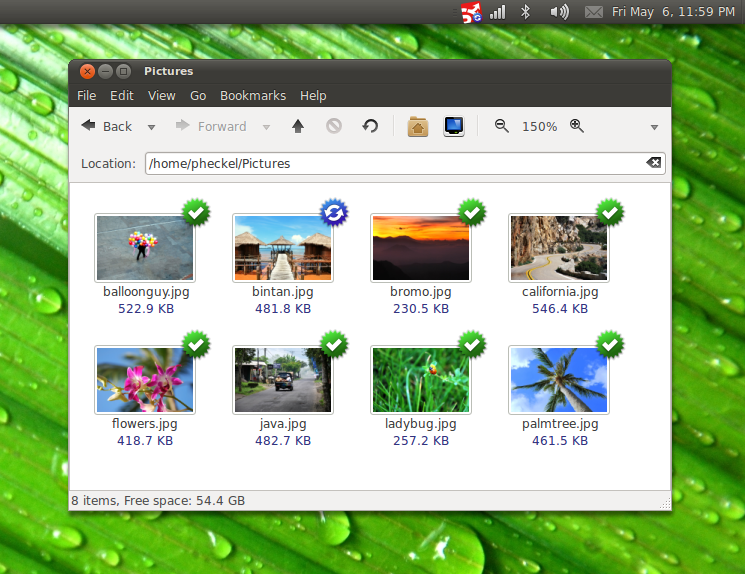
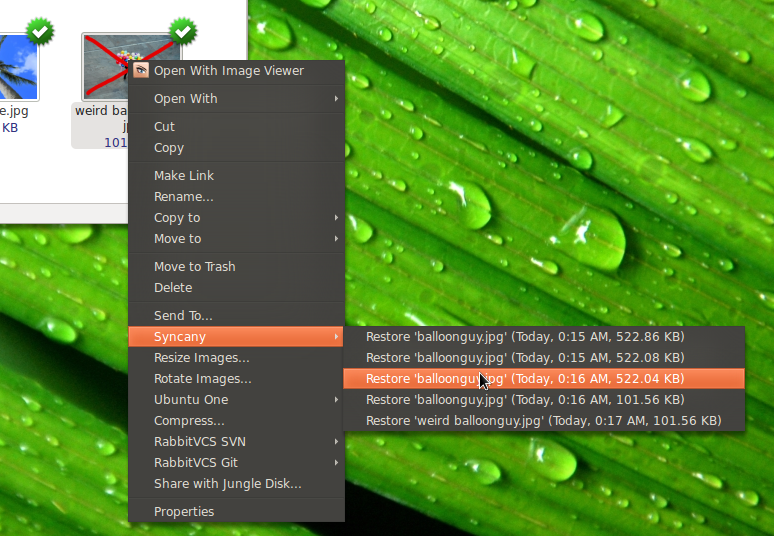
Adding up these features, I ended up with an additional three major things to do:
- Step-by-step repository setup wizard
- Platform-specific file manager integration (for Windows/Mac/Linux)
- File system watching to react on changes
Even in the first iteration of Syncany, I wanted to fit all these features into the software. And let’s be honest: You don’t have to be a genius to see that these are a lot of big time requirements. Putting all that together meant combining many more or less complex ideas.
As you might have guessed, I think that’s where it all went a little wrong.
2. What went wrong
Too many features, too many almost-working things: When I started Syncany, I wanted it all. I started to work on everything and I didn’t quite realize how complex it is going to be: synchronization, deduplication, encryption, decentralization, etc.
Simply look at the screenshots above – Syncany looks like it’s already working perfectly: There’s a step-by-step wizard user interface, Nautilus file manager integration, and files are synchronizing between clients. It’s not a fake. It worked. It still does, the trunk on Launchpad (from 2011, old!) still represents the code that you see in the screenshots.
You’re probably asking yourself what the problem with this code was (and still is). The answer to that question is really simple: The application architecture.
In short, the application had fundamental flaws in many of its central functionalities – including core components such as the file synchronization mechanism and the database structure. Here are a few examples:
- The metadata that the clients exchange was based on full CSV files (no deltas!) – meaning that the clients’ databases were basically exchanged in full whenever a tiny thing was changed. Imagine you rename a file in your Syncany folder. Syncany would add that ‘renamed’ file version to its local database and upload this database to the remote storage. If your database at that time was already couple of minutes/hours/days old, a few megabytes had to be uploaded. So instead of uploaded a delta (‘renamed version of file X’), the full database file would be uploaded.
- The file synchronization algorithm was initially based on a very straightforward idea: simply do exactly the same on each client. So if one client changes a file, this change will be recorded, transferred to the other clients, and applied on their machines. Sounds okay? Here’s the problem: If client A creates a file and changes it twice, client B has to download each version of the file and apply all updates locally (create file, change file, change file).
Instead, the sync algorithm could simply apply the last version of the file (and ignore all of the intermediates). In the newsync branch, I tried to overcome this issue by comparing the local version of the file to the target version. This is a good idea, but I failed to implement it correctly – I believe due to a lack of database structure and type clarity. - While there were many packages with distinct responsibilities, there was no real separation of concerns. Packages heavily depended on each other and were not testable individually. In fact, there were no real tests at all, making it virtually impossible to get it to a stable point. Tests consisted of the ‘classic’ trial-and-error approach.
Those are just three examples, but there are many more. In order to not make the same mistakes again, I tried to write them down in the following list. I already mentioned some of them:
- Too many features, too many almost-working things
- No working central core to build around
- No modulization, impossible to test
- Too early announcement, many people wanting to help, but I had no idea how to coordinate them
- Too early mavenization, made development harder
- No easy setup, no developer instructions
3. Current development
So where does this leave the application? What’s going to happen to Syncany in the future? Is it dead? Or will there be a release in the near future? Those are the kind of questions I receive every day – from people that are interested in the project, people that want to help out, and people that are sick of all the NSA-stories.
And those are valid questions! Heck, if I were a user (and I will be!), I’d want to know whether Syncany is just an ongoing experiment of a single person, or if it is actually going somewhere. You deserve to know. Here are some answers!
First of all: Syncany is not dead, it is very much alive and I am actively working on it every single day – on the train to work, after work and on the weekends with my friend and colleague Steffen Dangmann.
3.1. Refactoring and throwing things out
In the spirit of not making the same mistakes, we’ve done lots of work on the application architecture. We first threw out all of the non-core code – meaning file system watcher, graphical user interface, nautilus file manager extension, multi-threading, and so on – reducing the code base from about 20k lines of code and 400 lines of test code to only 8k lines of code, 122 tests in almost 6k lines of test-code, with a code coverage of about 70%.
After that, we evaluated the rest of the existing code and determined the usable parts of it – basically leaving only the chunking framework, i.e. the deduplication algorithms, and the storage/connection plugins. The rest of the code was really useful as an orientation, but most of it had to be (re-)written. In particular, that meant creating a delta-based database/metadata concept, a sensible synchronization algorithm to resolve conflicts and disk updates, and a modulized application structure (sync up, sync down, status, …).
In a nutshell, we ended up with the following core elements of the application:
The chunking framework offers functionality to apply different deduplication mechanisms. It breaks files into chunks, combines them into multichunks (containers), and transforms these multichunks before upload (compress, encrypt).
The database represents the internal state of a repository. It connects chunks and multichunks with the actual files and their versions. The database is used both locally to store the local state as well as to exchange the deltas with other clients.
In order to store the delta-databases and the transformed multichunks, the connection package offers an API to create storage plugins. A plugin must offer four methods to work with Syncany: upload, download, list and delete. We added three plugins by default: local directory, FTP folder and Amazon S3 bucket.
For the actual behavioral logic of the application, the operations package offers a set of commands that can be combined to create other commands. Central examples include ‘sync up’ (index local changes and upload), and ‘sync down’ (list remote changes, download and apply locally).
Other not-so-central parts include the config package and the command line interface. The config package represents a repository and user config, including encryption settings, machine name and storage plugin configuration. The command line interface represents the current command line-based Syncany client
syncany(orsyfor short). Commands can be called like this:sy up,sy downorsy status.
This is just a short overview, of course, but I’ll be detailing this in another post. So if you’re interested in more details about the inner workings of Syncany, please check out the second of this post as soon as it’s available. I’ll link to it here once I’ve finished writing it.
3.2. Back on track!
Having heard all these fascinating aspects of Syncany, I hope you got the main message: Syncany is back on track! We learned from our mistakes and scaled down to the essential parts. We’re taking smaller steps, and each step is tested with a corresponding test scenario.
As of now, there is a central core with what currently feels very much like a version control system. As I mentioned above, there is currently no real daemon functionality, no file system watching, no GUI and no file manager integration. These are the things that will follow at a later stage, and/or can be heavily supported by the community.
3.3. Where to find the code and project
We very recently moved the code from Launchpad to Github, because the Bazaar client for Windows is really broken – and development should be easy on all of the major operating systems. There is of course still much stuff on Launchpad, but the new master/trunk is on the Github!
The project homepage hasn’t changed in two years (except for news updates), but it’s still there, with all the screenshots and a description of the core idea.
3.4. Trying out what we’ve got so far
So are you already excited? I sure am! If you’d like to try out what we’ve got so far, you can check out the current code, compile/install it yourself (simply run ant, sudo ant fakeinstall, and then syncany) and test it in the sandbox. There is a small howto in the README file.
In short, run the following commands. The main focus is Linux and Windows right now, but it should also run on Mac OS:
Checkout, compile and install the current Syncany code
sudo apt-get install git ant openjdk-7-jdk
git clone https://github.com/binwiederhier/syncany SyncanyCore
cd SyncanyCore
git checkout e3d11300b3
ant
sudo ant fakeinstall
The ‘fakeinstall’ target creates symlinks in /usr/local/bin, so that you can run syncany or sy directly from the command line.
3.5. A quick example
This tiny example uses the ‘real’ syncany command line tool. I’ll create two Syncany folders on two different users (Alice and Bob) and use an FTP folder as repository.
Setup Alice’s Syncany configuration and repository access
alice@wonderland:~/$ mkdir Syncany
alice@wonderland:~/$ cd Syncany
alice@wonderland:~/Syncany$ sy init -i
The sy init -i command walks you through an interactive setup to create a config file. You can also call sy init <plugin> to initialize a skeleton config file, e.g. sy init ftp for the FTP plugin (the setup for other plugins works exactly the same). Before doing anything else, you can/must edit the config file using your favorite editor, e.g. vi .syncany/config.json. After editing, the file should look something like this:
Alice’s Syncany config file
{
  "machineName": "wonderlandalice7571283",
  "connection": {
    "type": "ftp",
    "settings": {
      "hostname": "ftp.aliceandbobsftpserver.com",
      "username": "ftpuser",
      "password": "ftppass"
      "path": "/repo1"
    }
  },
  "encryption": {
    "enabled": true,
    "pass": "supersecuresymmetricpassword"
  }
}
If you want to use the same repo on another machine, simply do the same for the second user/machine (here: Bob), and make sure that the ‘machineName’ is different. Once you’ve done that, you can start syncing!
Alice creates a file and uploads her changes
alice@wonderland:~/Syncany$ echo "Milk and Cookies" > shoppinglist.txt
alice@wonderland:~/Syncany$ sy status
? shoppinglist.txt
alice@wonderland:~/Syncany$ sy up
alice@wonderland:~/Syncany$
Bob can now download the changes and also upload files:
Bob receives the updates and also uploads a file
bob@thebuilder:~/Syncany$ sy ls-remote
? db-wonderlandalice7571283-1
bob@thebuilder:~/Syncany$ sy down
bob@thebuilder:~/Syncany$ ls
shoppinglist.txt
If you’re having trouble with the code, please do let me know, but remember that we’re still heavily developing and everything might change.
4. Future plans and upcoming releases
Having explained the details on how we got here and where we stand, let’s get into details about where we are going.
In short, I am still planning to release Syncany as open source and I am very confident that the release is not far away anymore. However, in order to not make the same mistakes again (see above!), I don’t want to announce anything until I am sure that the code is at least somewhat stable – meaning that I’d feel comfortable synchronizing files with it, and that I’ve done that for a few days/weeks. At this very moment, this is not yet the case – there are frequently popping up new and unexpected cases in which the synchronization fails. However, as said above, I can see the light …
As soon as the “day of light” has come, the current plan is to not release a first version to the broad public, but to “silently” release it to the people that have been interested in Syncany and the people that have been following the project – namely the Launchpad community and the people who wrote me e-mails about it. Of course the code will be online and available for everybody!
While I’m not promising anything, my current plan is to release something by the end of the year – nothing stable, just a developer preview of the command line client!
5. Outlook on the next posts
This post is only the first part of a few posts I am planning to write about Syncany. In the second post, I’ll go into details of the inner workings of Syncany as of now. That’ll probably include topics such as the synchronization mechanisms, the database structure, the chunking framework, the encryption and the connection/transfer plugins. I’ll also probably publish a screencast/video of what Syncany can do so far. So stay tuned!
If you have any questions, fire away in the comments section below, fork me on Github, or ask stuff on the Launchpad mailing list.
Update (14 Feb 2014): I finally got around to writing the follow-up blog post to this one (part 2). Check out Deep into the code of Syncany – command line client, application flow and data model (part 2).